Battery trouble often shows up without much warning, especially during Minnesota’s colder months. Many people in Spring Park, MN deal with this, especially with cold winters, lake moisture, and quick local drives that don’t always give batteries time to recharge. When your Toyota hesitates to start, it’s natural to wonder what’s going on and how serious it might be.
Getting familiar with Toyota battery replacement instructions can make those moments a lot less stressful. Knowing what’s involved, why each step matters, and when it’s smart to get help can prevent frustration and keep small problems from turning into bigger ones.
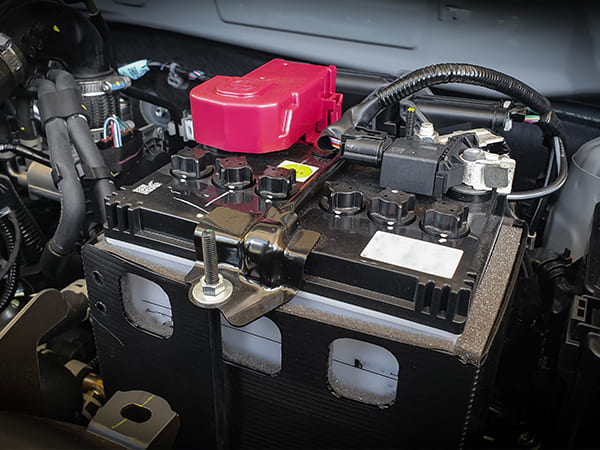
What Toyota Battery Replacement Really Involves
Toyota battery replacement is more than taking out an old battery and installing a new one. In today’s Toyotas, the battery supports computers, safety systems, and charging components that all rely on steady power. When everything is done the right way, the vehicle simply works the way it’s supposed to.
A proper Toyota battery replacement usually includes:
- Choosing a battery that meets Toyota’s exact specifications, not just one that fits the tray
- Protecting electronic memory and system settings during the swap
- Making sure the battery is secured firmly, so it doesn’t shift while driving
- Checking the charging system afterward to confirm everything is working together
From hands-on experience, most battery-related issues aren’t caused by defective parts. They’re more often the result of a battery that wasn’t selected or installed correctly. Following Toyota battery replacement instructions helps avoid those situations and keeps your Toyota running smoothly through Spring Park’s changing seasons.
How the Battery Replacement Process Works in Real Life
Below is a breakdown based on everyday experience working on Toyota vehicles commonly driven around the Lake Minnetonka area.
Confirm the correct battery type
Not every Toyota uses the same battery, so matching the replacement to your specific model is important. Some vehicles use flooded lead-acid batteries, others require AGM, and hybrids have a separate auxiliary battery. Installing the wrong type can lead to warning lights, charging problems, or systems acting unpredictably.
Shut the vehicle down fully
Before starting, make sure the engine and all electronics are turned off. This includes lights, radio, climate controls, and anything plugged into the vehicle. Keeping the key fob a short distance away helps prevent systems from turning back on while you’re working.
Disconnect the negative terminal first
The negative terminal should always come off first. This simple step helps reduce the chance of sparks and protects the vehicle’s electrical system. It’s a small detail, but it plays an important role in safety.
Disconnect the positive terminal
With the negative terminal removed, you can move to the positive side. Take your time and watch where your tools are placed. Avoiding contact with nearby metal helps prevent accidental shorts.
Remove battery hold-down brackets
Hold-down brackets keep the battery from moving while driving. These need to be removed so the battery can be lifted out safely. Set the hardware aside together so reinstallation goes smoothly.
Install the new battery securely
Place the new battery in the tray exactly how the old one sat. It should sit flat and feel secure, not loose or uneven. Proper positioning helps reduce vibration and wear over time.
Reconnect terminals in the correct order
Reconnect the positive terminal first, then finish with the negative terminal. This order follows proper Toyota battery replacement instructions and helps protect sensitive electronics. Tight, secure connections support reliable starting.
Test voltage and charging performance
Once the battery is installed, the charging system should be tested. This confirms the alternator is charging correctly and the battery is holding proper voltage. It’s the final step to make sure everything is working as intended.
Mechanic’s insight: Many newer Toyotas require a memory retention device during battery replacement to preserve idle settings and driver-assistance calibrations.
Common Toyota Battery Types Seen in Spring Park
| Toyota Model | Typical Battery Type | Average Lifespan |
| Camry / Corolla | Flooded or AGM | 3–5 years |
| RAV4 / Highlander | AGM (Start-Stop models) | 3–4 years |
| Prius / Hybrid models | Hybrid auxiliary battery | 4–6 years |
Battery selection is an important part of Toyota battery replacement instructions, especially with Minnesota’s temperature changes.
Signs Your Toyota Battery Needs Attention Soon
| Warning Sign | What It Often Means |
| Slow engine cranking | Battery capacity is declining |
| Flickering lights | Voltage may be unstable |
| Frequent jump-starts | Battery nearing the end of its life |
| Corrosion on terminals | Reduced charging efficiency |
Catching these signs early can help you avoid being stuck with a no-start situation.
Why Doing the Battery Replacement the Right Way Really Matters
When a battery is replaced correctly, the difference is noticeable. Your Toyota starts more easily on cold mornings, electronics behave normally, and unexpected warning lights are less likely to show up.
A proper battery replacement supports:
- Reliable cold-weather starts, especially during Minnesota winters
- Consistent operation of safety and driver-assist features
- Stable charging and voltage levels
- Fewer surprise dashboard warnings
AAA consistently identifies battery problems as the most common reason drivers request roadside assistance, with call volumes increasing during colder months when batteries are under greater strain.
Real Example: When a Simple Battery Swap Turns Into Dashboard Warnings
A Spring Park resident brought in a Toyota RAV4 after replacing the battery at home. At first, everything seemed fine—the vehicle started and drove normally. Within a few days, though, several warning lights appeared on the dashboard.
Here’s what the inspection showed:
- The installed battery did not meet Toyota specifications
- Voltage readings were inconsistent
- The vehicle’s computer systems were reacting to unstable power
After installing the correct AGM battery and resetting system memory, the warning lights cleared and the vehicle returned to normal operation. Situations like this show how Toyota battery replacement instructions protect more than just the battery—they help safeguard the electronics modern Toyotas rely on.
What Trusted Automotive Organizations Recommend
Toyota’s battery service procedures follow guidance from respected automotive organizations, including:
- Toyota Technical Service Bulletins (TSBs)
- SAE International, which sets global automotive electrical standards
- Battery Council International (BCI), defining battery safety and compatibility
These groups consistently stress proper battery selection, secure installation, and post-installation testing—core parts of Toyota battery replacement instructions.
What to Remember Moving Forward
Following Toyota battery replacement instructions helps support reliable starts, stable electronics, and confidence behind the wheel. Choosing the correct battery and completing proper testing makes a real difference, especially in Spring Park’s climate.
We follow manufacturer guidelines, use up-to-date diagnostic tools, and maintain service standards aligned with AAA-approved facilities. Our team provides battery testing, replacement, and electrical system evaluations tailored to Toyota vehicles.
Reach out to Certified Auto Repair for a professional Toyota battery inspection.
FAQs: Toyota Battery Replacement
How do I know which battery my Toyota needs?
Your owner’s manual lists the correct specifications, and a professional inspection can help confirm the exact type.
Will a new battery fix warning lights automatically?
Not always—some Toyota systems require resets after a battery is installed.
How often should my Toyota battery be tested?
Once a year is a good guideline, especially before winter in Spring Park, MN.
Do hybrid Toyotas follow the same replacement steps?
No, hybrid auxiliary batteries involve different safety procedures and handling.
Can short trips affect battery life?
Yes, frequent short drives may not give the battery enough time to fully recharge.