Modern Jeep vehicles utilize a complex Telematics Gateway Module (TGM) to facilitate secure Over-the-Air (OTA) updates. By managing the digital handshake between the Stellantis cloud and specific vehicle Electronic Control Units (ECUs), the system ensures data integrity. However, unstable voltage or interrupted signals during this process can lead to module communication failures and critical system errors.
Understanding Voltage Thresholds During Update Cycles
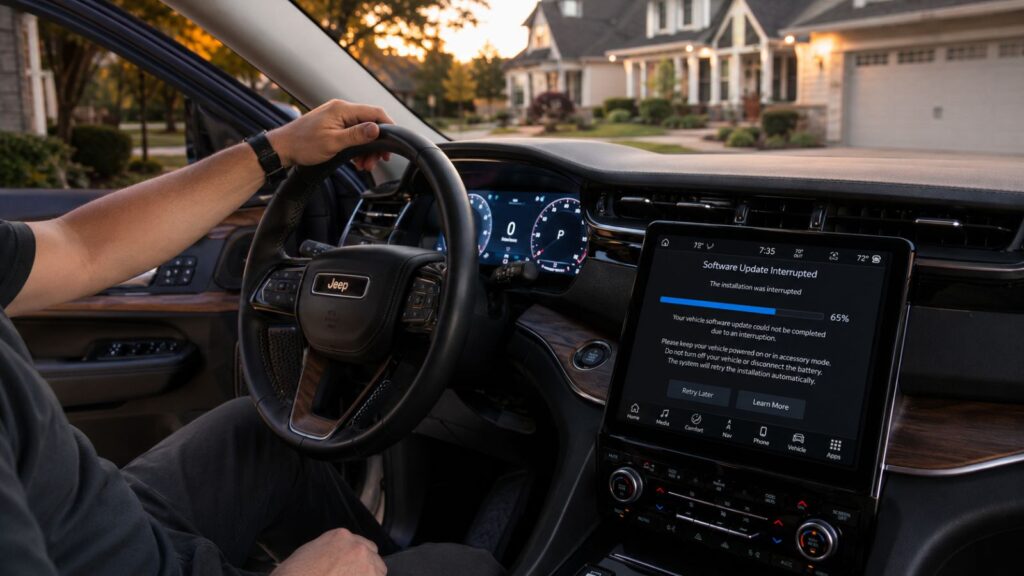
Unlike traditional mechanical engines, modern Jeeps are incredibly sensitive to minor voltage drops during software updates. The consequences are clear when a simple infotainment upgrade cascades into a full network crash. This places the system in a critical state where any loss of power threatens the core programming. If your battery drops even slightly below the required 13 volts, the Body Control Module (BCM) will kill the process to protect the hardware. That is when I see the dreaded bricked state: a frozen infotainment screen and a vehicle that refuses to wake up.
Navigating the Security Gateway Module Firewall
Stellantis introduced the Security Gateway (SGW) module to act as a digital bouncer for your Jeep. It sits directly between the OBD-II port and the internal network, ensuring that only authenticated packets enter the system. While this protects against unauthorized hacking, it also complicates our work during manual diagnostic repairs.
The Security Gateway blocks standard aftermarket scanners from seeing critical diagnostic data, making independent troubleshooting a major headache for owners. My role is to bridge this gap by utilizing factory-grade tools to bypass the firewall, communicate directly with the module, and resolve persistent digital handshake errors.
Identifying the Logic Loops Behind Software-Induced Stalls
Rather than a tangible mechanical failure like a snapped belt or restricted filter, the breakdown is a logical contradiction residing within the engine management architecture. I have spent countless hours mapping these digital dead-ends to restore normal operations for my clients.
I frequently see vehicles towed into my shop with powertrain failure lights, where the owner naturally assumes a mechanical part has failed. In reality, a partial firmware flash where the TGM updated the infotainment but failed to finish the handshake with the Powertrain Control Module (PCM) creates an endless logic loop. Official manuals often point to sensor replacements, but I look for the communication gap instead.
Essential Pre Update Safety Checkpoints
To mitigate the risk of firmware corruption and protect downstream modules, specific network and electrical conditions must be verified prior to initializing any dashboard update. Over the years, I have found that taking a few minutes to prep the vehicle saves hours of troubleshooting down the line:
- Test Internal Resistance: Use a conductance tester to ensure the battery can sustain heavy loads. When high resistance shows up during pre-checks at the shop, replacing the battery before attempting any programming is a must.
- Maintain Constant Voltage: Connect a clean power source to guarantee a steady 13.5V output. We never run an update in our service bays without a dedicated power supply hooked up to the terminals.
- Park in High Signal Areas: Avoid parking structures, underground garages, or known cellular dead zones that could easily interrupt the file download.
- Keep the Vehicle Static: Never attempt to drive, play the radio, or cycle the ignition while the installation is active. The best practice is to treat it like a critical computer update—let it finish completely uninterrupted.
Verifying Successful Firmware Deployment
Verification requires more than just checking that the infotainment screen turns on after a reset. Confirming that every single control module on the Controller Area Network (CAN) reports the correct software version to the central gateway ensures the entire vehicle operates on a unified, stable codebase.
When a troubled Jeep hits my lift, I do not guess. Connecting the factory wiTECH 2.0 system allows me to extract a full Vehicle Configuration Report to verify individual software part numbers. If I spot a persistent Version Mismatch diagnostic trouble code (DTC), I know the flash was interrupted and requires a manual force-flash.
Diagnostic Verdict: If the scan tool displays a U0100 Lost Communication with ECM code immediately following an OTA notification, do not attempt a battery disconnect. That risks pinning the gateway in a permanent partial-write state. Instead, perform a hard-reset of the Telematics module via wiTECH to safely force a re-handshake.
Overcoming Battery Fatigue and Firmware Corruption
Managing battery health remains the most overlooked variable in OTA success. Jeep firmware flashing is a power-intensive event that forces various modules into high-draw states for extended periods. During cold winters, cold-soak battery voltage drops significantly. Even if the battery starts the engine, it often lacks the reserve capacity to sustain a 45-minute firmware flash, leading to the common bricking incidents I handle at the shop.
Resolving firmware corruption is not a DIY job—it requires factory-level diagnostic access to bypass gateway lockouts safely. For professional wiTECH 2.0 force-flashing and network resets in the Twin Cities western suburbs, Certified Auto Repair at 4700 Shoreline Drive, Spring Park, MN 55384 serves as a fully equipped technical resource.
Frequently Asked Questions
Are Jeep Over the Air updates always perfectly reliable?
No. Jeep updates are not immune to failure despite being designed for convenience. Factors like low battery voltage, poor cellular signal during the download, or background module activity can interrupt the installation process, leading to incomplete firmware flashes that require manual intervention at a professional service center.
Does a version mismatch error indicate a failed update handshake?
Yes. A version mismatch error typically occurs when an Over the Air update successfully writes to one module but fails to complete the handshake with another related system. This generates a logic error across the Controller Area Network, which forces the system to disregard the new software parameters as technically invalid.
Is it safe to drive my vehicle while it performs an update?
No. You should never attempt to drive or operate your vehicle while a software update is in progress. Modern Jeep systems require the vehicle to be in a static, powered-on, or accessory-ready state to ensure constant voltage. Operating the vehicle can interrupt the flash, potentially rendering internal modules unresponsive.
Can technicians verify if an update installed correctly?
Yes. Technicians use the wiTECH 2.0 diagnostic system to pull a Vehicle Configuration Report. This report compares the installed software part numbers against the latest factory specifications. When logs indicate a failed digital handshake or a partial write, a manual force-flash is performed to overwrite the corruption and restore system integrity.
Does a low or dead battery prevent software updates?
Yes. Insufficient battery voltage remains a leading cause of update failure. Because Jeep firmware flashing is power-intensive, the system automatically suspends the process when voltage drops below the safety threshold to prevent corruption of the vehicle control modules.